
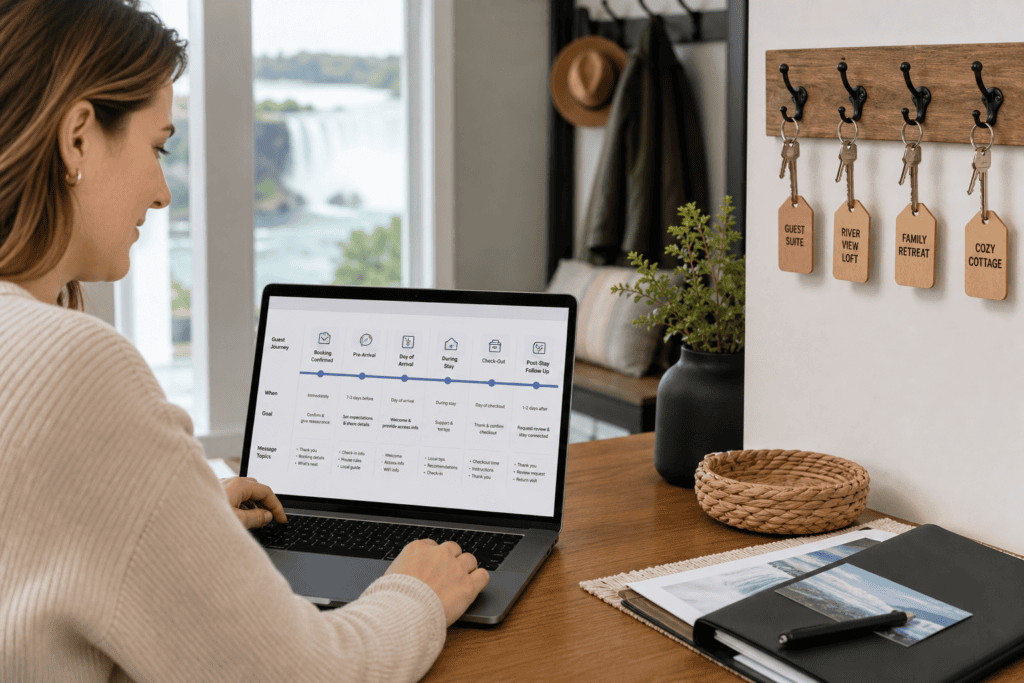
Effective guest messaging templates for Niagara Falls rentals should follow the guest journey, from the first inquiry through post-stay follow-up. They create consistency without assuming every property, reservation, or guest concern is the same.
Build each message around verified property information, use placeholders for details that can change, and reserve human judgment for access, safety, payment, maintenance, and conduct concerns. The result is a communication system that supports a smoother stay without making promises you cannot confirm.
Step 1: Map the Guest Messaging Workflow
Begin by listing every point at which a guest needs information or reassurance. A practical sequence for short-term rentals Niagara Falls hosts manage includes:
- Inquiry or pre-booking question
- Booking confirmation
- Pre-arrival reminder
- Check-in instructions
- First-night check-in
- Maintenance, access, or other stay concern
- Checkout reminder
- Post-stay follow-up
Routine information can be saved or scheduled, but unusual requests and reported problems need personal review. Messaging should also connect with housekeeping, turnover, maintenance, and owner oversight. HAH Developments describes its services as including guest communication, housekeeping and turnovers, listing optimization, and property maintenance. Learn more about its Airbnb hosting and co-hosting services.
Step 2: Gather and Verify Property-Specific Details

Create a fact sheet for each property before writing templates. Confirm:
- Guest name, dates, and number of guests
- Property address and verified arrival landmarks
- Check-in and checkout times
- Access method, code, key location, or building-entry process
- Parking instructions and restrictions
- Wi-Fi details and equipment instructions
- Available amenities
- House rules and confirmed policies
- Cleaning and checkout expectations
- Support contact and escalation process
- Current local information relevant to the stay
Use placeholders such as [Guest name], [property address], [check-in time], [door code], and [support contact] while drafting. Never leave one in a live message or replace it with a guess. Details can vary between properties, even when they are managed by the same Niagara property management company.
Step 3: Prepare Inquiry and Booking Templates
An inquiry response should answer the question directly and identify anything that still requires confirmation. Do not promise an amenity, exception, price, or policy that has not been checked.
Inquiry response
Hi [Guest name],
Thank you for your interest in [property name] for [dates]. The property is suitable for [confirmed occupancy or use]. [Answer the guest’s question using verified information.]
Please review the listing details and house rules before booking. If you have another question about the property or dates, send it here and we will confirm the details.
Best,
[Host or co-host name]
Booking confirmation
Hi [Guest name],
Your reservation for [property name or address] is confirmed from [arrival date] through [departure date] for [number of guests]. Check-in begins at [check-in time], and checkout is by [checkout time].
We will send verified arrival and access information before your stay. Please message us through [confirmed channel] if your plans or guest count changes.
We look forward to hosting you,
[Host or co-host name]
If a reservation includes documents, deposits, or property-specific requirements, refer only to the confirmed terms for that booking.
Step 4: Write Pre-Arrival and Check-In Messages
Arrival messages should help guests find the property, enter it, and request help if needed. Keep general preparation separate from sensitive access details, and confirm the reservation before sending a code or key instruction.
Pre-arrival reminder
Hi [Guest name],
Your stay at [property name or address] begins on [arrival date]. Please review these confirmed details:
- Check-in begins at [check-in time].
- Parking: [verified instructions].
- Access: [verified method or when full instructions will be sent].
- Important property information: [relevant confirmed rule].
If you expect to arrive outside the agreed time or have an access question, contact [support contact] before travelling.
Check-in instructions
Hi [Guest name],
Your arrival instructions for [property address] are:
- Go to [verified entrance or location].
- Use [verified access method] with [code or key instructions].
- Once inside, [verified first step].
If the instructions do not work, contact [support contact] through [confirmed method]. Do not share access details with anyone outside your reservation.
Enjoy your stay,
[Host or co-host name]
Stop point: Check the guest name, dates, property, access method, and code before scheduling or sending this message. A correct template sent to the wrong reservation can still create a serious problem.
Step 5: Add First-Night and During-Stay Check-Ins
A brief first-night message gives guests a clear way to ask for help and may reveal an access or property issue early.
First-night check-in
Hi [Guest name],
I wanted to check that you arrived safely and accessed [property name]. If anything is unclear or you need help locating an amenity, message [support contact]. For a maintenance concern, a description and photo, if safe and practical, can help us understand the issue.
Thank you,
[Host or co-host name]
Maintenance concern
Hi [Guest name],
Thank you for letting us know about [issue]. Please confirm [necessary detail, such as the room or item involved] and, if safe, send [photo or short description].
We are reviewing the next step and will update you through [confirmed channel]. If there is an immediate safety risk, leave the affected area if appropriate and contact local emergency services. Notify us when it is safe to do so.
Do not ask guests to investigate a dangerous condition or attempt a repair. A template structures the first response; it does not replace a property-specific assessment.
Step 6: Define Escalation Rules for Problems
Separate routine questions from access failures, suspected hazards, payment disputes, significant damage, urgent water or electrical problems, and conduct concerns. These issues should be reviewed by a responsible person.
Direct guests to the confirmed contact process for that property. If 24/7 support or handyman availability applies, state that accurately and provide the correct route. HAH Developments states that it offers 24/7 guest support and handyman availability, but every issue may have a different response process.
For immediate danger, tell guests to use the appropriate local emergency service rather than relying on a host message. Do not insert a guessed phone number, building procedure, insurance instruction, or municipal rule into a generic template.
Step 7: Prepare Checkout and Review Follow-Up Messages
Keep checkout messages short and limited to confirmed booking requirements. Avoid adding tasks that conflict with the turnover process.
Checkout reminder
Hi [Guest name],
Thank you for staying at [property name]. Before leaving by [checkout time], please complete these confirmed steps:
- [Return a key or follow the approved departure procedure]
- [Place specified items where instructed]
- [Other confirmed requirement, if applicable]
If you notice damage, leave an item behind, or have trouble following the instructions, contact [support contact] and tell us what happened.
Safe travels,
[Host or co-host name]
Post-stay follow-up
Hi [Guest name],
Thank you for staying with us. If you have feedback about the property or communication, please share it through [confirmed channel]. Your comments help us identify instructions or property details that need attention.
Best,
[Host or co-host name]
Ask for honest feedback rather than implying that a positive review is expected.
Step 8: Localize Messages for Niagara Falls Carefully
Local context can help guests, but only when it is accurate for the property and current at the time of the stay. You might include verified directions, parking guidance, nearby attractions, seasonal information, or route details.
Keep local recommendations separate from essential access instructions. Check attractions, routes, opening details, parking conditions, and seasonal statements before sending. Do not state licensing requirements, taxes, noise rules, or transportation schedules without a current authoritative source.
For your visit to Niagara Falls, [insert verified local information and source or link]. Conditions can change, so please check current details before travelling.
Step 9: Test the Sequence Before Guests Arrive
Read the messages as if you were arriving for the first time. Confirm:
- The guest, dates, occupancy, and property are correct.
- Every placeholder has been replaced.
- Check-in and checkout times match the reservation.
- The address, entrance, parking, and access instructions are clear.
- Codes, links, phone numbers, and Wi-Fi details work.
- The guest knows what to do if access fails.
- Housekeeping and turnover staff have current information.
- The escalation route reaches the responsible person.
Stop point: Do not schedule a template containing an unverified access detail, local rule, contact route, or promise. Fix the source information first, then test again.
Step 10: Review Templates After Each Stay
After each stay, note repeated questions, confusing arrival steps, access problems, maintenance reports, checkout misunderstandings, and local information that has changed.
Check whether messaging aligns with the work behind the scenes. A pre-arrival message may depend on turnover completion. A maintenance response may need to reach a handyman or property manager. A checkout message should reflect what the housekeeping team actually requires.
HAH Developments describes a service scope including cleaning, turnovers, maintenance, listing optimization, compliance management, and owner oversight. Its property management services provide more information about that wider operational support.
When Should an Owner Use Co-Hosting Support?
Self-management may suit an owner who can monitor inquiries, send accurate arrival information, coordinate turnovers, respond to problems, and keep property details current. Co-hosting may be useful when those responsibilities compete with work, travel, multiple properties, or an owner’s ability to provide consistent support.
Ask prospective providers which messages they handle, which responsibilities remain with the owner, how property details are approved, how maintenance concerns are escalated, and how turnover information is shared. This is more useful than choosing a provider based only on promises of more bookings or better reviews.
HAH Developments provides Airbnb hosting and co-hosting in Niagara Falls, with services described as including guest communication, housekeeping and turnovers, listing optimization, and 24/7 guest support. Owners can also review what to look for in Niagara Falls property management before deciding between limited co-hosting and broader management.
Conclusion: Turn Templates Into a Reliable Guest Communication System
Start with the guest journey, not a collection of generic scripts. Map the communication points, verify property facts, and create adaptable messages for inquiries, bookings, arrival, support, checkout, and follow-up. Then define escalation boundaries, test the sequence, and revise it when real questions or operational issues reveal a gap.
Templates support routine communication, but they cannot replace judgment when a guest cannot enter, reports a hazard, disputes a payment, identifies damage, or needs urgent maintenance. If managing that system alongside bookings, cleaning, turnovers, and property care is impractical, consider whether co-hosting or full-service management fits your needs.
The Home Away From Home Developments Inc. provides Airbnb hosting, co-hosting, and short-term property management services in Niagara Falls, including guest communication and related rental operations. Contact HAH Developments to discuss your property and support needs.